
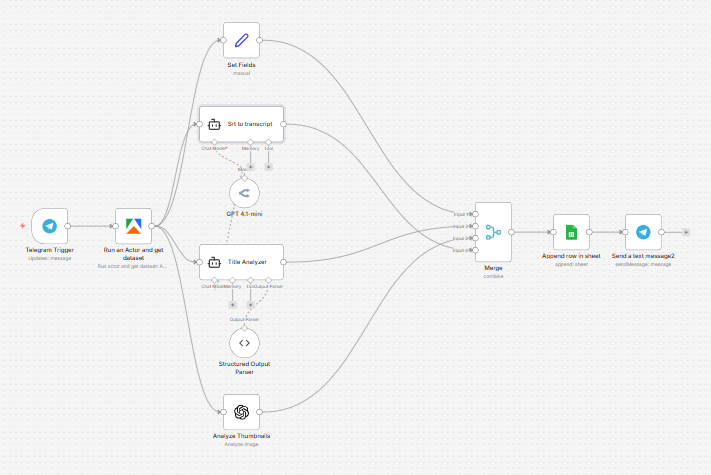
This n8n workflow turns a YouTube URL sent through Telegram into a structured content-analysis report.
It automatically scrapes the video’s metadata, extracts and cleans the transcript, analyzes the title for clickable “power words,” reviews the thumbnail to explain why it attracts attention, saves everything to Google Sheets, and sends a summary back to Telegram. It’s designed for creators, researchers, and marketers who want a fast way to study what makes a YouTube video work.
Use cases
This workflow is ideal for YouTube creators, content strategists, and researchers who want to break down successful videos quickly.
It’s especially useful if you:
- Want to analyze competitor videos from your phone
- Need a repeatable system for studying titles and thumbnails
- Want to save cleaned transcripts for future scripting or research
- Keep a swipe file of strong YouTube ideas in Google Sheets
- Want instant feedback on what makes a video compelling
Good to know
- This workflow uses Telegram as the input and delivery channel.
- It relies on an Apify YouTube Scraper actor to extract video data.
- It uses OpenRouter / GPT-4.1-mini for transcript cleanup and title analysis.
- It uses OpenAI Vision to analyze the thumbnail image.
- Results are appended to a connected Google Sheet, which acts as your analysis log.
- The workflow expects a YouTube URL from Telegram and uses Telegram’s link preview URL as the source.
How it works
This workflow follows a simple analysis pipeline from Telegram input to saved report.
1. Receive a YouTube link in Telegram
- A Telegram Trigger starts the workflow when a message is received.
- The workflow grabs the YouTube URL from the message’s link preview data.
- That URL is passed into the Apify YouTube Scraper actor for enrichment.
2. Scrape the video data
The scraper collects key information about the video, including:
- Channel name
- Video title
- Video URL
- Thumbnail URL
- View count
- Likes
- Subtitles / SRT transcript when available
A Set Fields node then organizes the most useful metadata into a cleaner format for downstream analysis.
3. Clean the subtitles into a readable transcript
- If subtitles are available, the Srt to transcript AI node converts the raw SRT file into a clean script.
- It removes:
- timestamps
- subtitle numbering
- broken line fragments
- filler and repeated words
- The goal is to preserve the speaker’s meaning and flow without rewriting the content.
This gives you a much cleaner version of the video script for reference or repurposing.
4. Analyze the title for power words
- The Title Analyzer AI node reviews the video title.
- It extracts 1 to 3 power words or short phrases that likely make the title more clickable.
- Instead of rewriting the title, it identifies the attention-grabbing elements inside it.
This is useful for studying headline patterns across your niche.
5. Analyze the thumbnail
- The Analyze Thumbnails node uses vision AI to inspect the thumbnail image.
- It explains, in simple terms:
- what the viewer notices first
- what curiosity or promise the image creates
- why it may encourage clicks
This gives you fast thumbnail feedback without manually interpreting every design element yourself.
6. Merge the results and save them
- A Merge node combines:
- metadata
- cleaned transcript
- title analysis
- thumbnail analysis
- The workflow appends all of this into a Google Sheet called MyYoutubeAnalysisScriptLog.
The sheet stores:
- Channel
- Title
- URL
- Thumbnail
- Views
- Likes
- Power Words
- Thumbnail Analysis
- Script
7. Send a summary back to Telegram
Finally, the workflow sends a Telegram message with a quick summary, including:
- Channel name
- Title
- URL
- Thumbnail URL
- Views
- Likes
- Top 3 power words
- Thumbnail analysis
- A note that the script was saved to the sheet
This gives you both an instant chat summary and a persistent record in Google Sheets.
How to use
- Send a YouTube URL to your Telegram bot.
- Wait for the workflow to scrape and analyze the video.
- Read the summary in Telegram.
- Open your Google Sheet to review the full logged analysis and cleaned script.
Tips:
- Use videos with subtitles enabled for the best transcript output.
- This works especially well for studying viral videos, competitors, and niche leaders.
- Keep your Google Sheet organized so you can sort later by topic, channel, or title pattern.
Requirements
- A Telegram Bot connected to n8n
- An Apify account with access to the YouTube Scraper actor
- An OpenRouter account for GPT-based text analysis
- An OpenAI account for thumbnail image analysis
- A Google account connected to Google Sheets
- A Google Sheet set up to store the analysis log
Customising this workflow
You can extend this workflow in several useful ways:
- Add a video-summary node to extract the main ideas from the transcript
- Score titles and thumbnails with a custom rating system
- Add a niche classifier so each analyzed video is tagged automatically
- Save results to Airtable, Notion, or a database instead of Google Sheets
- Send the analysis to Slack, email, or Discord instead of Telegram
- Add a second AI step that suggests improved title variations
- Build a dashboard from the Google Sheet to spot repeating patterns across top-performing videos