
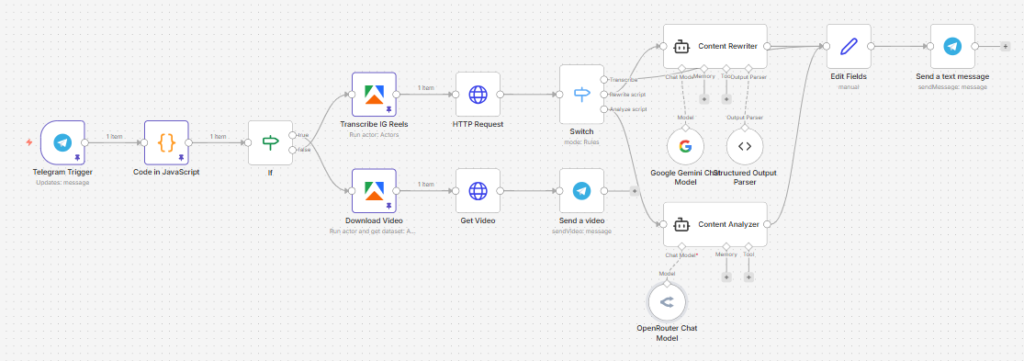
This n8n workflow turns an Instagram Reel URL sent through Telegram into one of three outputs on demand: a transcript, a rewritten script, or a viral content analysis.
Instead of manually extracting Reel content and pasting it into AI tools, you can send a Telegram command with an Instagram URL, and the workflow will fetch the Reel, transcribe it, then either return the raw transcript, rewrite it into a new short-form script, or analyze its structure and persuasion mechanics. It also includes a separate command to download the Reel video back into Telegram.
Use cases
This workflow is ideal for creators, marketers, scriptwriters, and researchers who study short-form content and want a faster mobile workflow.
It’s especially useful if you:
- Want to transcribe Instagram Reels from your phone
- Rewrite successful Reel scripts into your own tone or language
- Analyze viral content structure before creating your own version
- Save time switching between Instagram, transcription tools, and AI chat tools
- Need a simple Telegram-based content research assistant
Good to know
- The workflow is controlled through Telegram bot commands.
- It uses Apify to extract Instagram Reel transcripts and scrape Reel video data.
- It uses Google Gemini to rewrite scripts.
- It uses OpenRouter to generate strategic script analysis.
- The rewrite path is designed for short-form script adaptation, including an English + Khmer output format.
- The workflow supports a separate video download command for sending the Reel file back through Telegram.
How it works
This workflow starts with a Telegram message and routes the request based on the command used.
1. Telegram command intake
- A Telegram Trigger starts the workflow when a message is received.
- A Code node extracts the Instagram Reel URL from the command text.
- An IF node checks whether the user requested a video download or a transcript-based task.
2. Download Reel video path
If the message starts with /downloadig:
- The workflow sends the Instagram URL to an Apify Instagram Reel Scraper
- It retrieves the Reel’s direct video URL
- An HTTP Request downloads the video
- The video is sent back to the user in Telegram using Send a video
This turns Telegram into a simple Instagram Reel downloader.
3. Transcript extraction path
For all other supported commands, the workflow uses the Instagram AI Transcript Extractor actor in Apify.
- The Reel URL is sent to Transcribe IG Reels
- Apify returns a dataset endpoint containing the extracted transcript
- An HTTP Request fetches the transcript data
- A Switch node determines which output the user requested:
/transcribe/rewritescript/analyzescript
4. Transcribe command
If the command starts with /transcribe:
- The workflow takes the extracted transcript directly
- It formats the transcript into a simple output field
- Telegram sends the transcript back to the user as a text message
This is the fastest path when you only want the spoken script.
5. Rewrite script command
If the command starts with /rewritescript:
- The transcript is sent to the Content Rewriter AI node
- Google Gemini rewrites it into a short-form script based on a specific “Candid Pragmatist” voice profile
- The prompt instructs the model to output:
- one English paragraph
- one conversational Khmer paragraph
The result is designed for repurposing Instagram content into a punchier, creator-style script format.
6. Analyze script command
If the command starts with /analyzescript:
- The transcript is sent to the Content Analyzer AI node
- OpenRouter analyzes the Reel as a viral content asset
- The output focuses on things like:
- hook structure
- narrative flow
- psychological triggers
- virality levers
- reusable script framework
This is useful when you want to reverse-engineer why a Reel performs well, rather than just copying it.
7. Return the result to Telegram
- A Set node standardizes the chosen output
- The result is sent back through Telegram as:
“Transcript/Rewrite/Analysis:” followed by the generated output
This makes Telegram both the control panel and the delivery channel.
How to use
Send one of these commands to your Telegram bot followed by an Instagram Reel URL:
/transcribe [instagram-url]→ get the transcript/rewritescript [instagram-url]→ get a rewritten script/analyzescript [instagram-url]→ get a viral content breakdown/downloadig [instagram-url]→ receive the Reel video file
This makes it easy to research and repurpose content directly from your phone.
Requirements
- A Telegram Bot connected to n8n
- An Apify account with access to:
- Instagram AI Transcript Extractor
- Instagram Reel Scraper
- A Google Gemini API connection
- An OpenRouter account
- Proper credentials configured in n8n for Telegram, Apify, Gemini, and OpenRouter
Customising this workflow
You can extend this workflow in several useful ways:
- Save transcripts and rewrites to Google Sheets or Notion
- Add a summary command for key takeaways only
- Generate multiple rewrite styles for different platforms
- Add hooks, CTA rewrites, or headline suggestions
- Send outputs to Slack, email, or a database instead of Telegram
- Add language options beyond English and Khmer
- Turn the analysis output into a reusable swipe-file system