
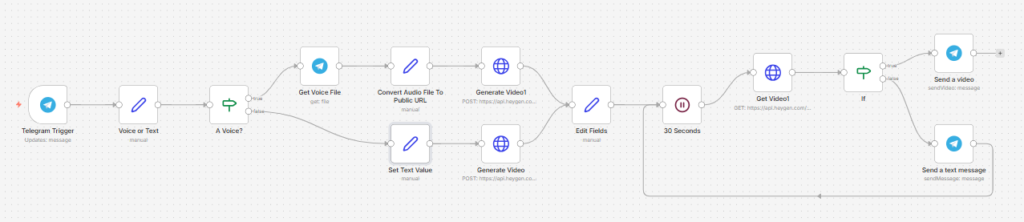
This n8n workflow lets you create a HeyGen avatar video directly from Telegram, using either a voice note or a text message as the input.
It is designed as a simple “message in, talking-avatar video out” system: you send content to a Telegram bot, the workflow sends it to HeyGen using your chosen avatar, waits for the render to finish, and then delivers the finished video back to you in Telegram.
Use cases
This workflow is ideal for creators, coaches, consultants, and marketers who want to generate talking-head videos quickly without recording manually every time.
It’s especially useful if you:
- Want to turn voice notes into avatar videos
- Need a fast way to create text-to-video spokesperson content
- Use Telegram as a lightweight mobile control panel for content creation
- Want to reuse a HeyGen avatar for repeatable short-form videos
- Need a simple workflow for testing avatar video ideas on demand
Good to know
- This workflow requires a HeyGen account and API access.
- It uses a specific preconfigured HeyGen avatar and voice ID.
- Telegram must be configured to receive both text messages and voice notes.
- HeyGen rendering is not instant, so the workflow includes a polling loop that keeps checking the render status until the video is ready.
- The output format is vertical 720 × 1280, which is suitable for short-form social content.
How it works
This workflow has two input paths: one for voice notes and one for text messages.
1. Trigger from Telegram
- A Telegram Trigger starts the workflow whenever a new message is sent to the bot.
- A Set node stores the incoming text value.
- An IF node checks whether the message contains text or whether it should be treated as a voice-note flow.
2. Voice-note flow
If the incoming Telegram message is a voice note:
- The workflow retrieves the file using Get Voice File
- It converts the Telegram file path into a public audio URL
- That audio URL is passed into HeyGen Video Generate
- HeyGen creates a video where the configured avatar speaks using the uploaded audio
This path is useful when you want to preserve your original pacing and delivery instead of generating speech from text.
3. Text-to-video flow
If the incoming Telegram message contains text:
- The workflow extracts the message text
- It sends the text directly to HeyGen
- HeyGen uses the configured avatar and voice to generate a talking-avatar video from the written script
This is the faster option for turning short scripts or ideas into presenter-style videos.
4. Render tracking
After either generation path starts:
- The returned video_id is saved
- A Wait node pauses the workflow
- The workflow checks render progress using HeyGen video_status.get
- An IF node checks whether the video status is
completed
If the video is not ready yet:
- the workflow sends a Telegram message saying “It’s still rendering”
- waits again
- and checks the status again
This loop continues until the final video is available.
5. Deliver the finished video
Once the video status is complete:
- The final video URL is returned from HeyGen
- The workflow sends the video back to the same Telegram user using Send a video
That means Telegram becomes both the input channel and the delivery channel.
How to use
- Send either:
- a text message, or
- a voice note
to your Telegram bot
- Wait while HeyGen renders the video
- Receive the finished avatar video back in Telegram
For best results:
- Keep voice notes clear and free from background noise
- Use short, direct text prompts for cleaner avatar delivery
- Test with shorter scripts first to speed up rendering
Requirements
- A Telegram Bot connected to n8n
- A HeyGen account with API access
- A configured HeyGen avatar
- Proper API credentials for:
- Telegram
- HeyGen HTTP requests
Customising this workflow
You can extend this workflow in several ways:
- Let users choose between multiple avatars
- Add AI rewriting before text is sent to HeyGen
- Generate captions or subtitles automatically
- Save finished videos to Google Drive or cloud storage
- Post completed videos directly to social platforms
- Add error handling for failed or stalled renders
- Support different output formats such as square or landscape