
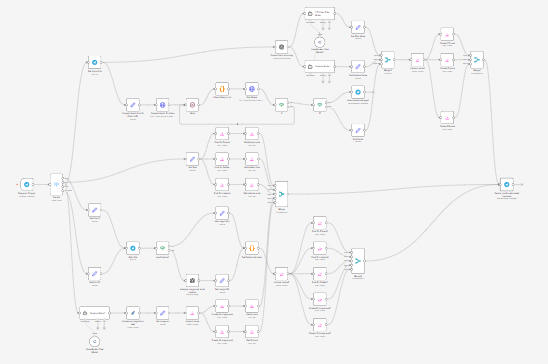
This n8n workflow uses AI to transform text, images, or voice notes sent via Telegram into fully formatted, multi-platform social media posts — automatically.
It acts as an on-demand content engine: you simply send any type of content to Telegram, and the workflow intelligently processes it, generates optimized captions (and titles where needed), and publishes it across platforms like X (Twitter), LinkedIn, Instagram, Facebook, Threads, and YouTube.
Use cases
This workflow is ideal for creators, founders, and social media managers who want a single input → multi-platform output system.
It’s especially useful if you:
- Capture ideas as voice notes on the go and want them turned into content
- Share images or screenshots and want instant captions + posting
- Write quick text thoughts and distribute them everywhere
- Want a mobile-first content workflow without opening multiple apps
- Need consistent, AI-assisted posting across multiple platforms
Good to know
- This workflow uses multiple AI services:
- OpenAI (for transcription and image analysis)
- OpenRouter (for caption and title generation)
- The Json2Video API is used to convert voice notes into video content.
- The Blotato node is required for publishing and needs a separate account.
- AI usage and video rendering may incur small costs depending on usage.
- Voice-to-video processing includes a retry system and may take up to a few minutes.
How it works
This workflow dynamically adapts based on the type of content sent via Telegram.
1. Content Detection (Smart Routing)
- A Telegram Trigger listens for incoming messages.
- A Switch node detects the content type:
- Text
- Image
- Voice note (audio)
- Document
Each type follows a different processing path.
2. Text Posting Flow
- If plain text is received:
- The text is extracted and used directly as post content
- The workflow posts it to:
- X (Twitter)
- Threads
This is the fastest path for quick idea sharing.
3. Image Posting Flow
- If an image is sent:
- The image is retrieved from Telegram
- If a caption is included → it is used
- If no caption → AI analyzes the image and generates one
- The image is uploaded to Blotato
The workflow then posts to:
- X (Twitter)
- Threads
This enables instant visual content distribution with AI-generated engagement captions.
4. Voice → Video → Post Flow
This is the most advanced part of the workflow:
- The voice note is retrieved and converted into a public URL
- OpenAI transcribes the audio into text
- AI generates:
- A caption optimized for engagement
- A YouTube Shorts title
- The audio is converted into a video with branding using Json2Video
- The workflow checks rendering status with retries and timeout handling
Once ready:
- The video is uploaded
- It is posted to:
- YouTube (with AI-generated title)
This turns raw thoughts into polished video content automatically.
5. Post Confirmation
- Each platform returns a posting status
- Merge nodes ensure all posts complete
A confirmation message is sent back via Telegram:
“✅ Posted successfully! Your content has been published to all platforms.”
- If video rendering fails or times out, an error message is sent instead
How to use
- Send any of the following to your Telegram bot:
- A text message
- An image (with or without caption)
- A voice note
- The workflow automatically detects the format and processes it
- Wait for the confirmation message once posting is complete
Tips:
- Keep voice notes clear for better transcription
- Use captions when you want full control over messaging
- Test each content type individually before scaling
Requirements
- A Telegram Bot connected to n8n
- A Blotato account with connected platforms:
- X (Twitter)
- Threads
- YouTube
- An OpenAI account (for transcription + image analysis)
- An OpenRouter account (for AI caption/title generation)
- A Json2Video account (for voice-to-video conversion)
Customising this workflow
You can extend this workflow in powerful ways:
- Customize AI prompts for different tones (e.g., sales, educational, storytelling)
- Add platform-specific captions instead of one universal message
- Introduce a review/approval step before posting
- Store all generated content in a database or Google Sheets
- Add automatic hashtags or keyword optimization
- Schedule posts instead of publishing instantly
- Add support for long-form content or blog publishing