
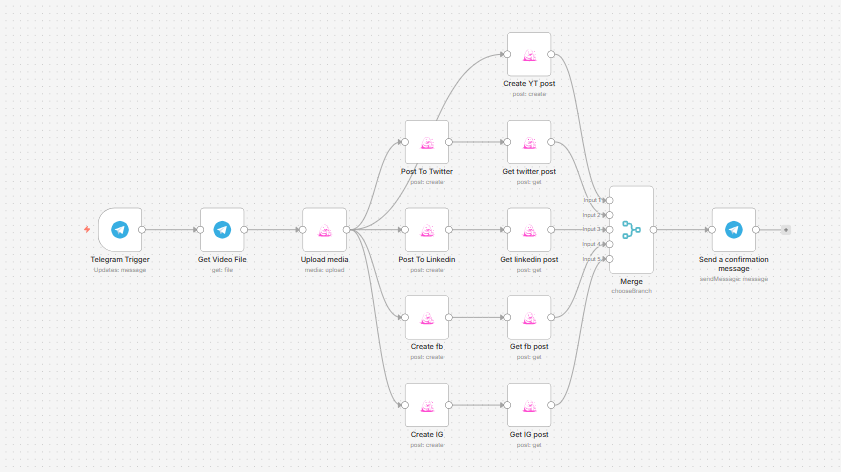
This n8n workflow automates the process of turning a video sent via Telegram into a fully published multi-platform social media post.
Instead of manually downloading, uploading, and posting content across different platforms, this workflow lets you send a single video (with a caption) to Telegram and instantly distributes it to X (Twitter), LinkedIn, Facebook, Instagram, and YouTube — all in one go.
Use cases
This workflow is ideal for content creators, personal brands, and social media managers who want to streamline their publishing process.
It’s especially useful if you:
- Create short-form video content and want to distribute it everywhere quickly
- Manage multiple social accounts and want to avoid repetitive posting
- Use Telegram as a central content hub or “drop zone” for media
- Want a fast, mobile-first publishing workflow without logging into multiple platforms
Good to know
- The workflow relies on Blotato, a third-party community node, for publishing content across platforms. A Blotato account is required.
- Each social platform must be connected inside Blotato before use.
- Telegram bots require proper setup and permissions to receive video files.
- Uploading and posting large videos may take time depending on file size and platform limits.
How it works
This workflow is a single streamlined pipeline triggered by Telegram and ending in multi-platform publishing.
1. Content Intake (Telegram)
- A Telegram Trigger listens for incoming messages.
- When a user sends a video with a caption, the workflow starts.
- The caption is used as the post text across all platforms.
2. Media Retrieval & Upload
- The workflow retrieves the video file using the Telegram “Get Video File” node.
- The video is then uploaded to Blotato via the Upload Media node, generating a usable media URL for posting.
3. Multi-Platform Publishing
Once the media is uploaded, the workflow simultaneously publishes the content to multiple platforms:
- X (Twitter) → posts video + caption
- LinkedIn → posts video + caption
- Facebook → posts video + caption to a selected page
- Instagram → posts video + caption
- YouTube → uploads the video with the caption as the title
All platforms use the same caption and media file, ensuring consistent branding and messaging.
4. Post Confirmation Tracking
- After each post is submitted, the workflow retrieves the post status using “Get post” nodes for each platform.
- A Merge node waits for all platform responses to complete.
5. Notification
Once all posts are successfully processed, a Telegram message is sent back to the user:
“✅ Posted successfully! Your content has been published to all platforms.”
How to use
- Send a video with a caption to your connected Telegram bot.
- The caption becomes your post text across all platforms.
- Wait for the confirmation message in Telegram once posting is complete.
Tips:
- Keep captions platform-appropriate since the same text is reused everywhere.
- Ensure your video format is supported by all target platforms.
- Test with short videos first before scaling.
Requirements
- A Telegram Bot connected to n8n
- A Blotato account with connected social media platforms:
- X (Twitter)
- YouTube
- Proper API credentials configured in n8n
Customising this workflow
You can easily extend this workflow depending on your needs:
- Add AI-generated captions before posting (e.g., rewrite per platform tone)
- Include a content approval step via Slack or email before publishing
- Add hashtags automatically based on video content
- Store posts in a database or Google Sheet for tracking
- Split captions per platform instead of using the same text everywhere
- Add scheduling instead of instant posting (queue system)